
Injection tooling Available
The plastic part needs its mold too.
Pick the part, the material and how many you are making. Out comes the moldability study, where it opens, the core and the cavity, the tool assembly with every component, and the press saved next to the mold. Change machines and the earlier version stays.
Part → moldability → parting → core and cavity → tooling → press
- 01
Can this part be molded?
You start from the part you already have, its material and how many you need. Before any tooling is drawn, the app reads the part: wall thickness, draft, undercuts — whatever is going to fight the mold.
- 02
Where it opens
The parting line, the core and the cavity. It is the decision everything else hangs on: the two halves, the ejection direction, and what will show on the finished part all come from it.
- 03
The whole tool, not a pretty drawing
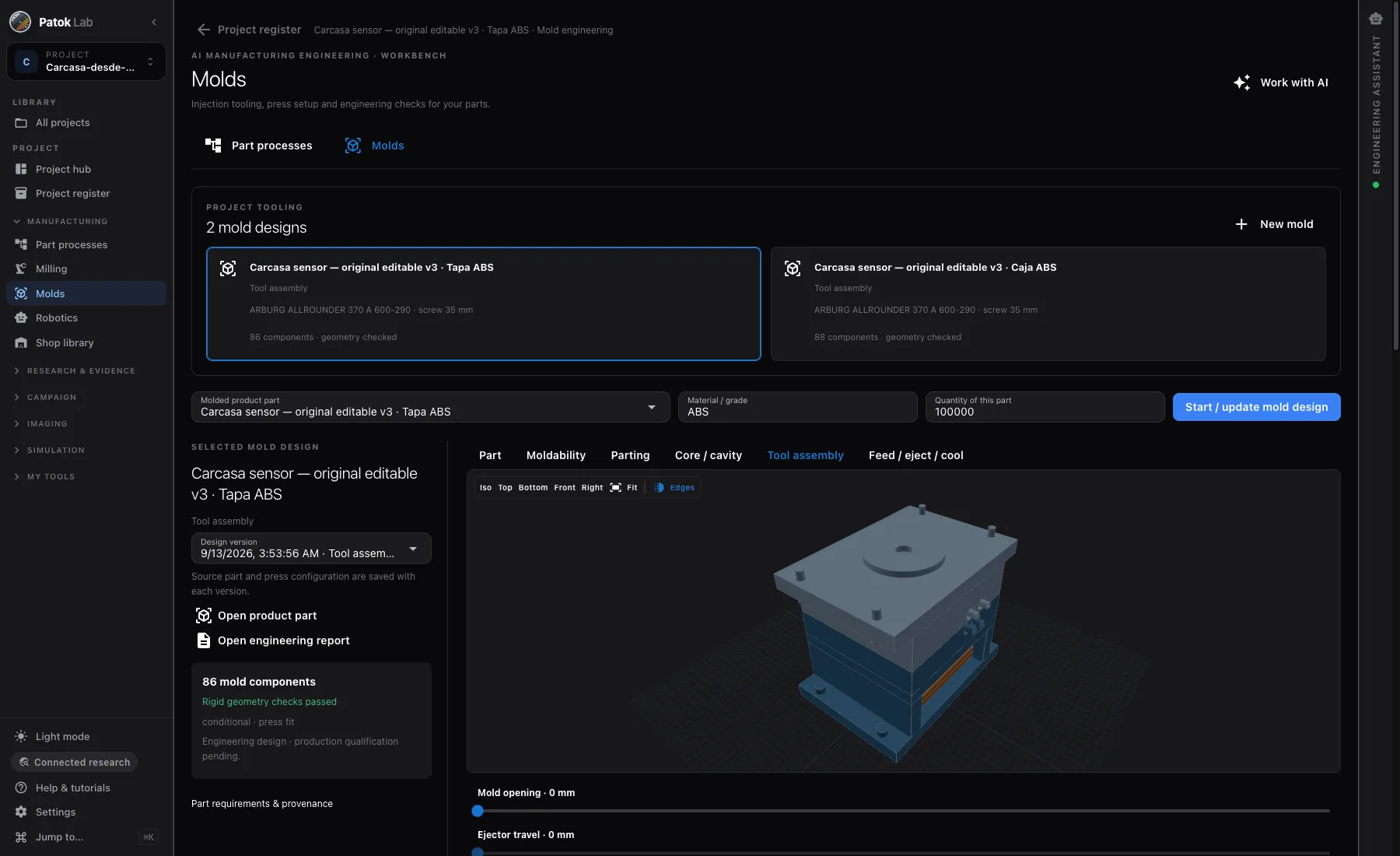
Eighty-six components in an assembly you can open, with its geometry checks run. Mold opening and ejector travel move right there, so you see the clearance before you quote it.
- 04
The press is saved with the mold
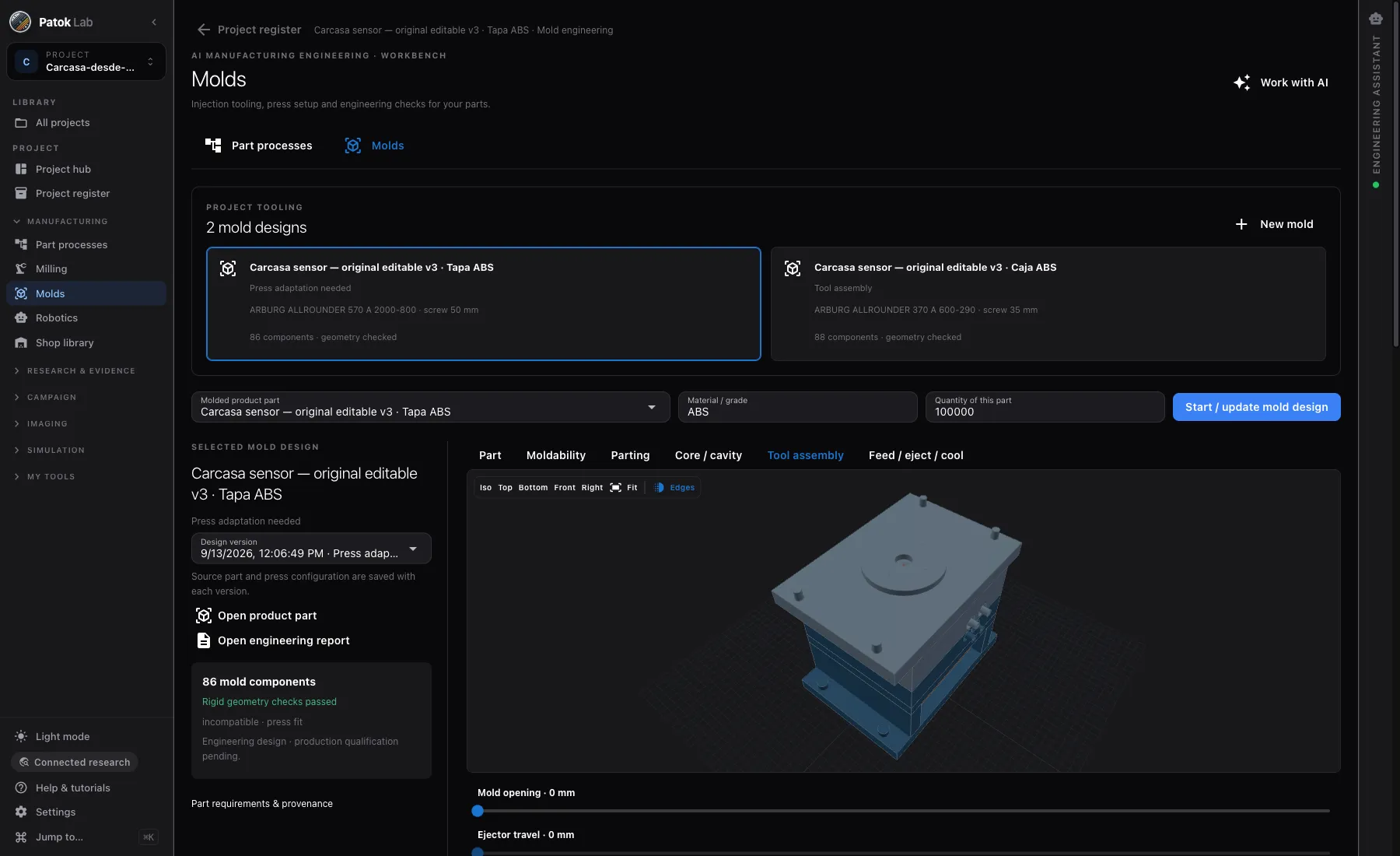
An ARBURG ALLROUNDER 370 A 600-290 with a 35 mm screw is not a loose note: it stays attached to the design. Run it on another machine tomorrow and the app saves that version without erasing the first, so you can compare.
What is in the app today
- Several tool designs living in one project, each with its own press
- Eighty-six mold components with their geometry checks run
- Moldability study, parting line, core and cavity, feed, ejection and cooling
- Mold opening and ejector travel, movable on the same screen
- Material and quantity are part of the study, not a note on the side
- Changing machines makes a new version and keeps the old one
- The engineering report and the source part open from the same place
Before you cut steel
- What comes out is engineering design. Production qualification is still yours, and the app says so on the screen instead of hiding it.
- The checks are geometry and the interfaces between components. There is no fill simulation and no thermal solve on the cooling.
- It covers the documented small-mold family and rigid geometry today. Curved shells are still open, and it says so.
Typical starting points
A housing you are going to mold
You have the part and the volume. You want to know how it opens, how many components the tool carries and which press it lands on before asking for a quote.
A part that came from the customer
You did not design it, and somebody has to say whether it molds as drawn — or what has to change, and why.
Two presses and a decision
The same mold against two machines, each saved with its own version, so you can compare without losing the first.
A review with the molder
Open the assembly, move the opening and the ejector, and argue over the same geometry instead of over a PDF.
Early access
Early access for people who run real processes — labs, engineering teams and shops.
Bring a customer drawing, a table of runs, a folder of micrographs or a part you spray, weld or mill. We want Patok Lab used on live work and told what breaks. The Community edition is free, with no time limit; macOS, Windows and Linux.
- macOS, Windows and Linux — tell us which one you need first
- Direct line to the founder during early access
- Optional workshop for your group or team: bring a job, leave with an artifact
- 01Tell us what you would bringA drawing, a table of runs, a folder of micrographs, a part, a line.
- 02The build arrives by e-mailInstaller, a licence you paste once, and a short guide for the bench you came for.
- 03Reply with your fileWe look at it before we send it, and a person answers — not a form.
Get access Bring a drawing, some photos, a table or a part. Or just tell it.
Bringing it to a team, a shop or a university group? Ask for your team →
FAQ
Questions engineers and researchers ask first.
Does this replace my mold designer?
No. What it does is get you to that conversation with the part reviewed, the parting proposed, the tool assembled and the press chosen. Whoever cuts steel still decides — now about something concrete instead of about an e-mail.
Where does the press come from?
You configure it once and it is saved with the design: machine, screw and what goes with it. Every version of the mold remembers which machine it was made against.
What if I change machines halfway?
A new version is saved and the earlier one stays. You do not lose the work done against the old press, and you can see both.
Is it connected to the rest of the workbench?
Yes. The mold lives in the same project as the part, its drawing and its programs. Tooling belongs to its mold and never supersedes the molded product.