
Machining · CAD and milling 3-axis milling · CAD and CAM
Hand it a drawing. Get back the part, the plan and the program.
A customer PDF becomes a solid part written as code you can read and built by the CAD engine, measured rather than asserted. The engineering drawing is projected back out of the part’s own faces. The route is read from its features, the cut is simulated and checked, and one program per setup goes to the machine in a package that travels.
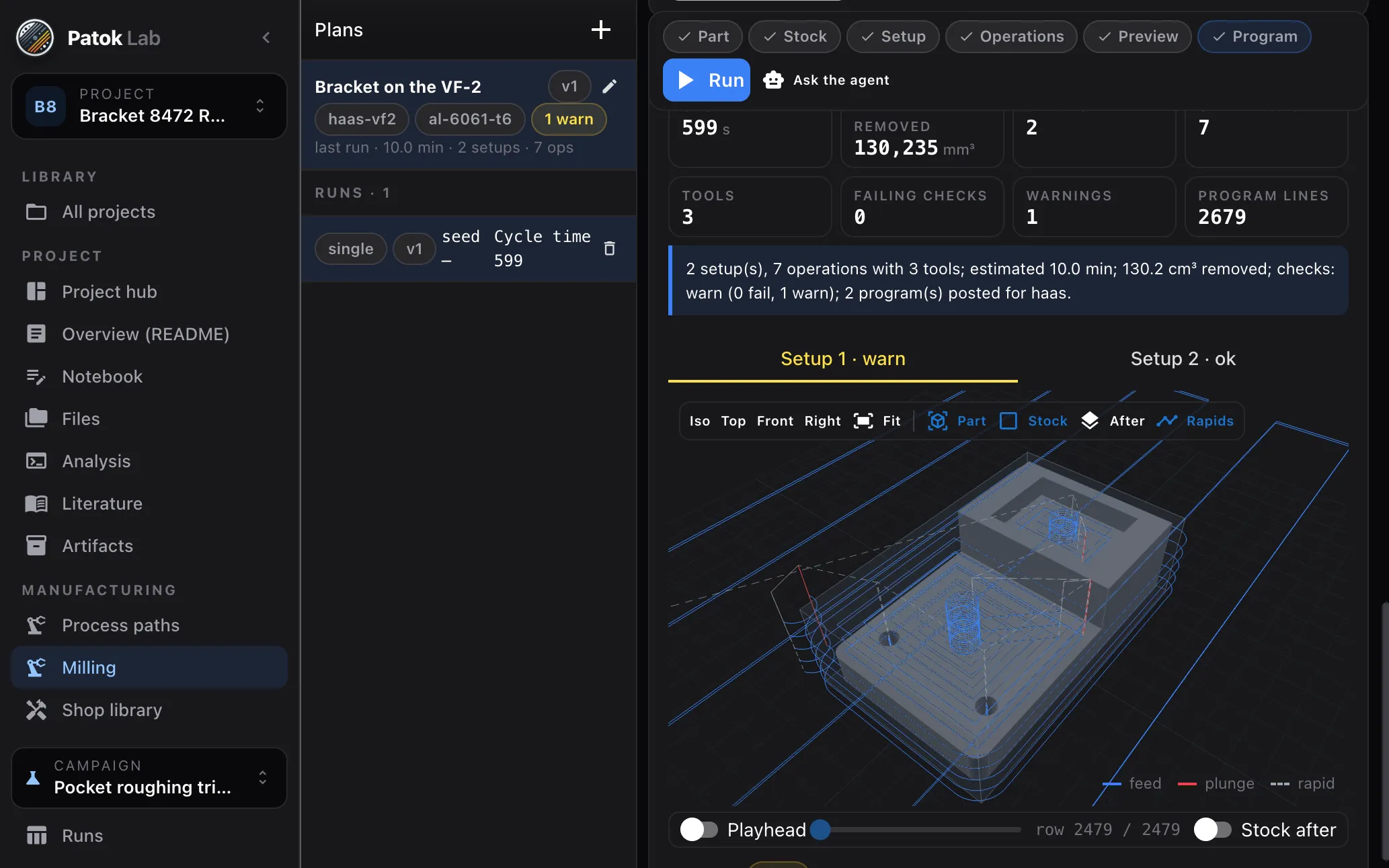
Drawing → part → drawing → route → simulation → programs → package
- 01
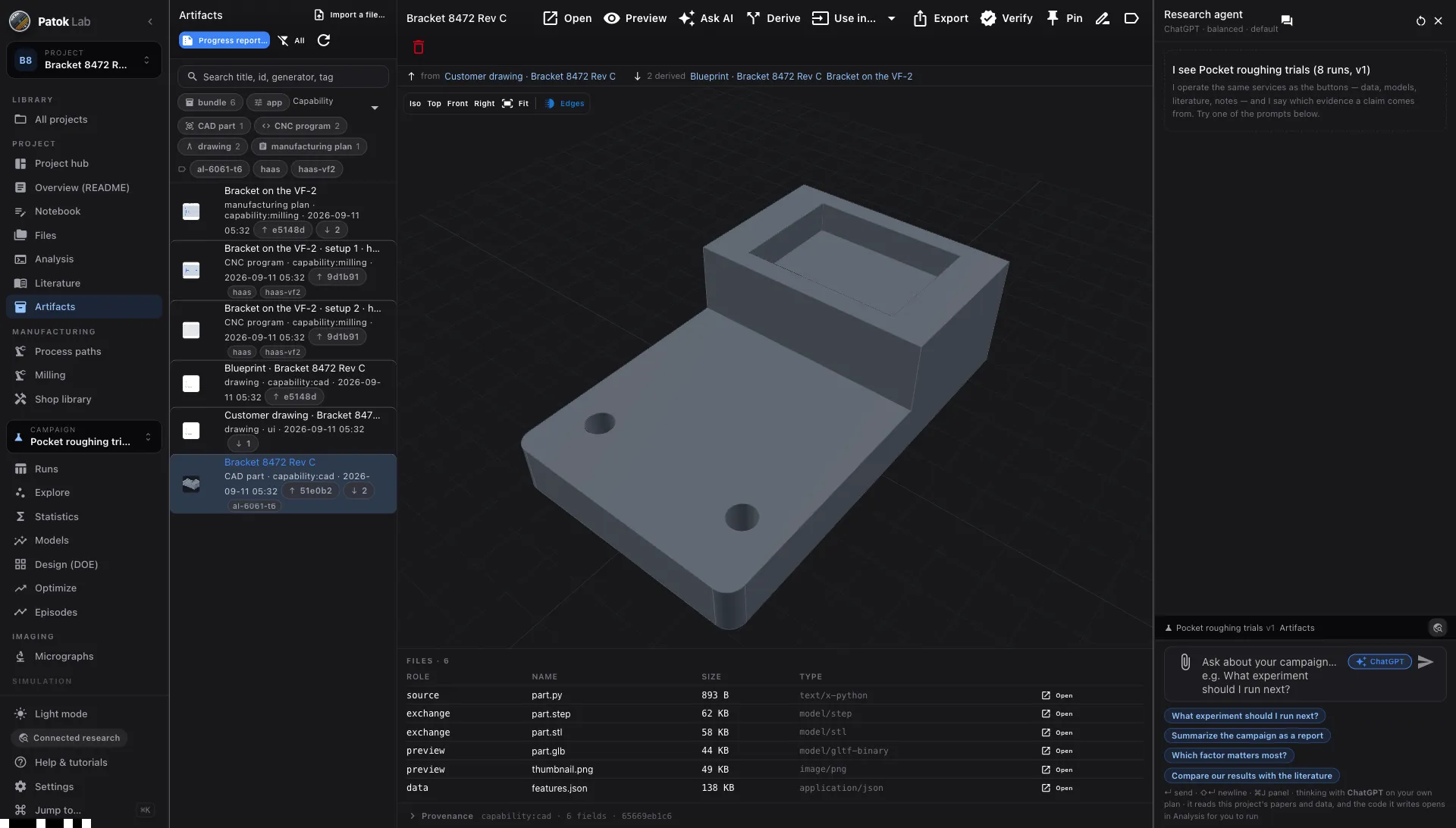
The part, measured not claimed
The model writes the geometry and the CAD engine builds the solid. What comes back is measured: volume, mass, faces, holes, pockets. Import a STEP, IGES, BREP, STL, OBJ or 3MF instead and it is the same artifact, with the same features read from it.
- 02
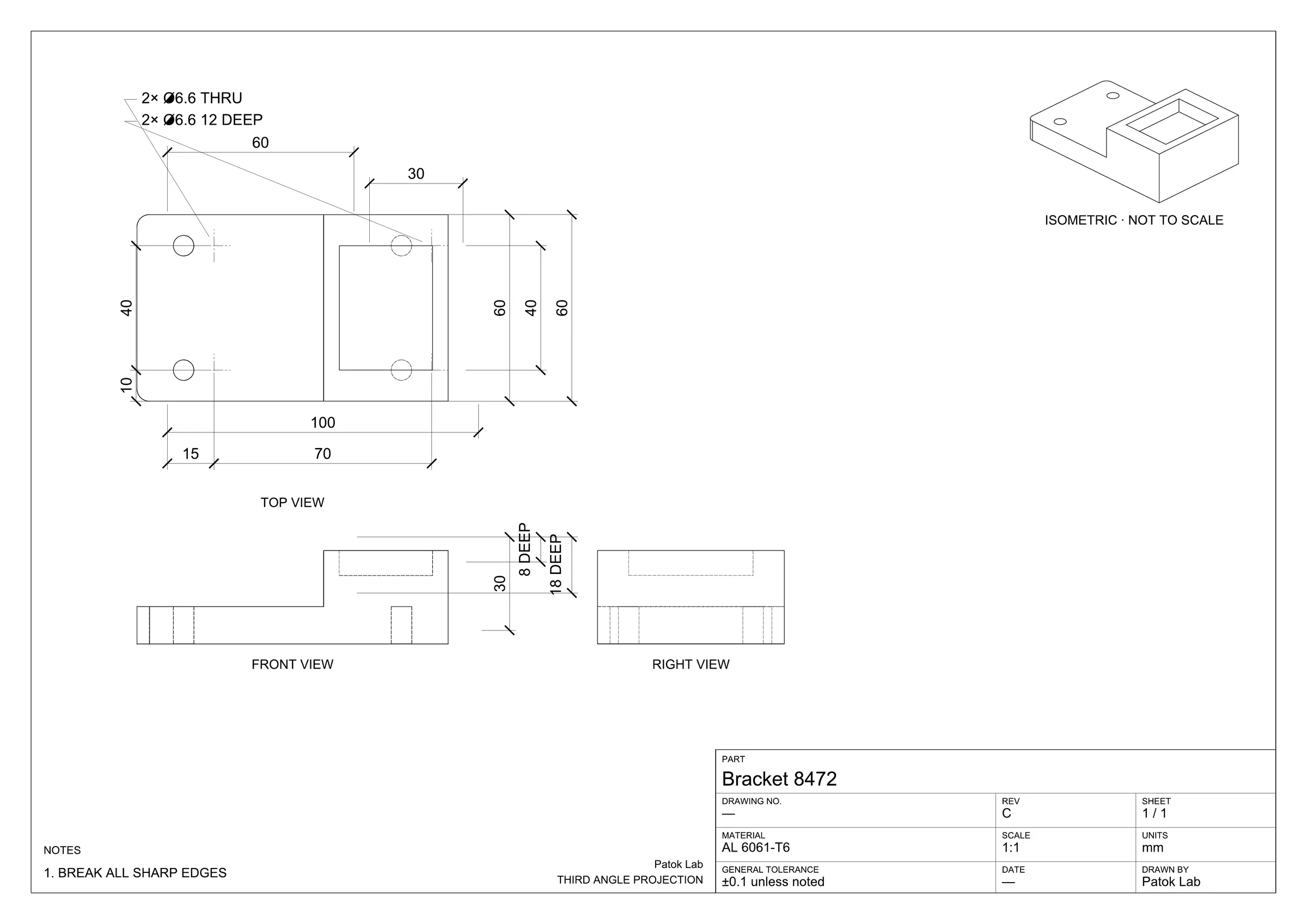
The drawing, projected back out
Third-angle top, front and right views plus an isometric, drawn from the part’s own faces. Dimensions derive from the recognised features — overall sizes, one callout per hole diameter, pocket depths — with a title block and notes. Real DXF and PDF, ISO 128 and 129-1.
- 03
The route, from the features
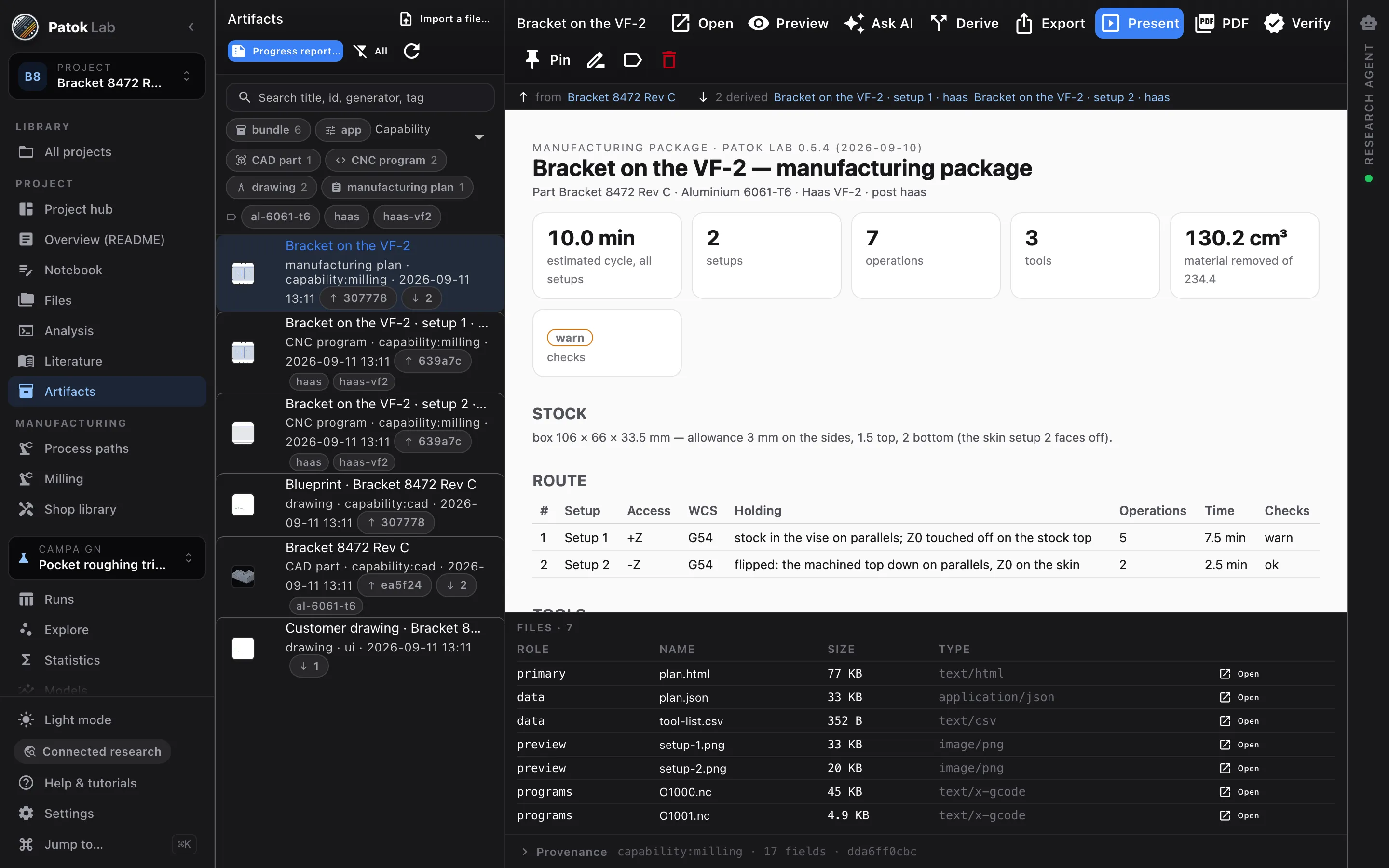
Each feature records the direction it is reachable from, and the route falls out of that: how many setups, what each one reaches, the datum, the WCS. You name the fixtures and the order. Feeds and speeds come from the shop library with their formula and their source, clamped by the machine profile.
- 04
Simulated, checked, then posted
The simulation removes the material setup by setup — the stock one setup leaves is the stock the next one starts from. Nine checks look for gouges, rapids through material, machine limits, flute length, uncut material. A failing check blocks the post unless you force it.
- 05
An assembly, sorted into what you make and what you send out
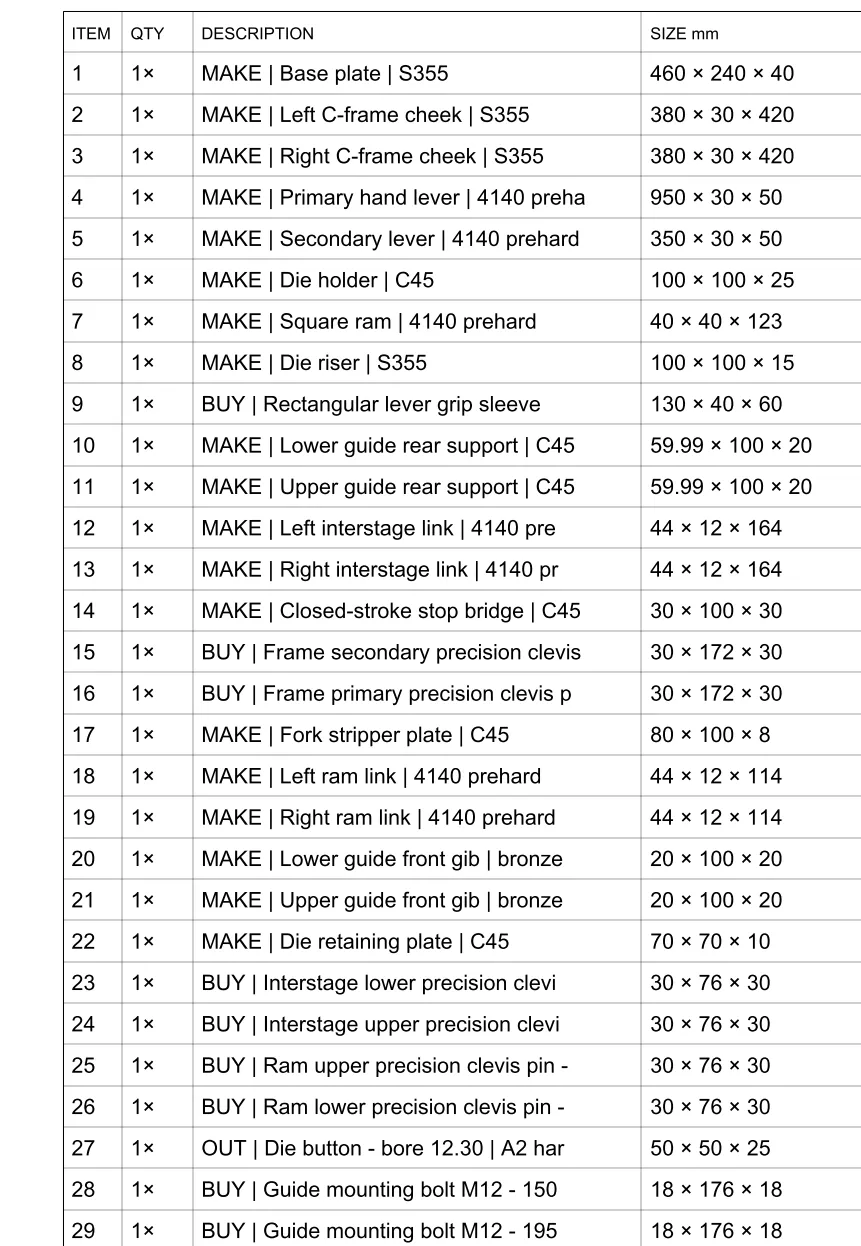
A different job: a whole punch press, eighty-one ballooned items, each with its word. The S355 base plate you make here. The bearing is catalogue — you buy it by part number. The punch goes out to another shop — but it goes out with your drawing, your A2 and your processes written down: harden and temper, cylindrical grind, surface grind. That third word is what stops a shop from giving its engineering away along with the part.
- 06
And the detail, dimensioned from a declared zero
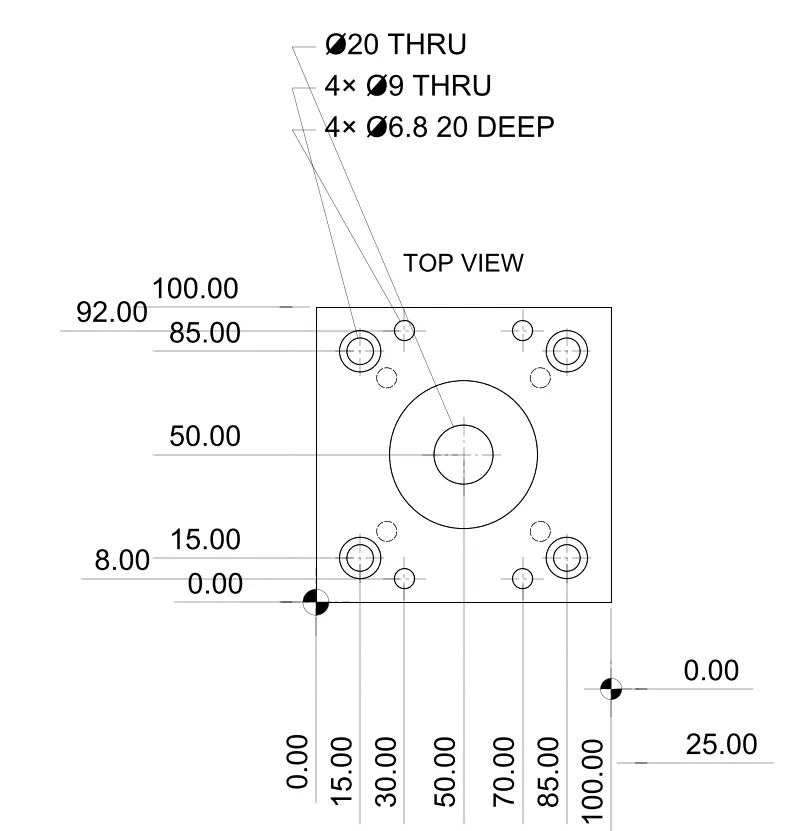
Every part you make drops to its own sheet. Ordinate dimensions from a zero written into the notes — X0 Y0 at the X− Y− corner, Z0 at the finished top face — so whoever programs it and whoever measures it start from the same point. Material, scale, general tolerance, and which item of the assembly it came from.
- 07
And if the part is a body of revolution, it comes off the lathe
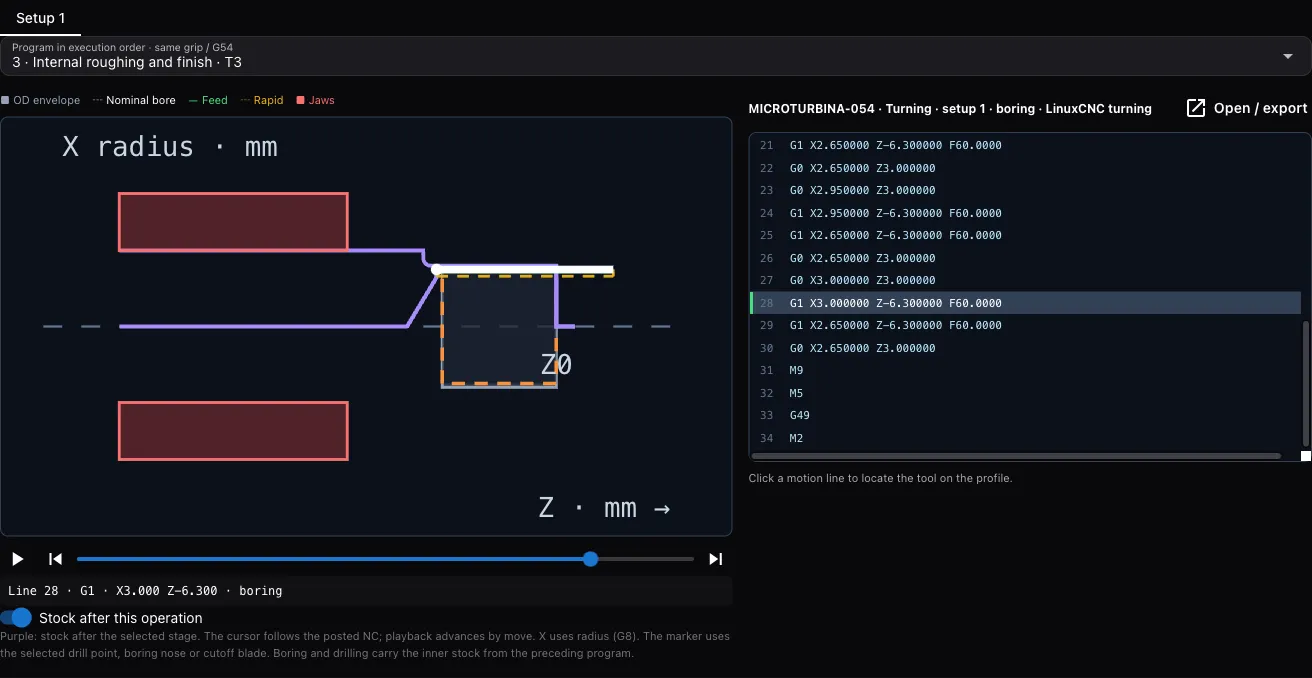
Same part, another machine. From bar stock in one grip: axial peck drilling, boring of through interiors, steps and cutoff, with tools from your library and the program ordered by operation. Before it writes one it checks entry, reach, bar body, overhang, jaws and part catcher — if something does not fit, there is no program.
In 30 seconds
The corner CAD allows and a cutter cannot make.
A pocket with square internal corners draws fine in any CAD and no cutter will make it: an end mill leaves a radius. Here is the case, why it happens, and what Patok Lab does when it finds one — before somebody finds it at the machine.
See it in one minute
What is in the app today
- CAD bundled — nothing else to install
- STEP, IGES, BREP, STL, OBJ and 3MF in; STEP, STL, GLB, BREP, OBJ, 3MF, DXF, SVG and PDF out
- Assemblies as one artifact with their tree and a BOM
- Face, contour, pocket with islands, drill and helix, plus 3D parallel finishing
- Material-removal simulation per setup, nine machining checks and fourteen G-code lint rules
- LinuxCNC, Fanuc 0i/30i, Haas NGC and GRBL 1.1 — one program per setup, plus a setup sheet
- A shop library of machines, materials and tools you can edit and keep
- A manufacturing package that opens anywhere: route, tools, setup sheets, figures and programs in one file
Before the spindle turns
- Turning today covers bodies of revolution from bar stock in one grip. Blind holes, threads and geometry outside that scope are said on screen, not hidden.
- The drawing goes out marked as what it is: preliminary, not released for manufacture. And it should. What can be written down, the machine writes; who releases it is whoever knows the machine, the material and the customer. That criterion is the work, not the paperwork.
- The post-processors are authored from public manuals and have never been run on a controller. Every program header says so and asks for a simulation and a dry run at reduced feed.
- The simulation shows the material the cutter takes off, against the part. It is not a collision study of the whole machine.
- The cycle time is an estimate with no acceleration model.
- Feature recognition covers planar and cylindrical faces. Three axes, ±Z setups only.
- No adaptive or trochoidal clearing, no rest machining, no turning, no assembly constraint solver.
Typical starting points
A customer drawing you have to quote
Bring the PDF. Get a solid you can measure, a route with its setups and an estimate you can read before you commit to a delivery date.
A part that needs four setups
The route is read from the geometry, not guessed. Each setup posts its own program and its own setup sheet, and the simulation chains from one to the next.
A fixture or a test coupon
Describe it in a sentence, get the part and the drawing, and cut it the same afternoon — with the checks between the program and the spindle.
A part that also becomes an experiment
The plan’s cycle time and material removed land in the runs table, so roughing trials become a campaign with a model and a next recommendation.
A part to spray or coat instead
The same part goes Use in → Robotics, and the raster or build-up is generated on its real surface.
A drawing that arrived in an e-mail
Import a file… takes it from wherever it is. Nothing has to be an artifact first.
Early access
Early access for people who run real processes — labs, engineering teams and shops.
Bring a customer drawing, a table of runs, a folder of micrographs or a part you spray, weld or mill. We want Patok Lab used on live work and told what breaks. The Community edition is free, with no time limit; macOS, Windows and Linux.
- macOS, Windows and Linux — tell us which one you need first
- Direct line to the founder during early access
- Optional workshop for your group or team: bring a job, leave with an artifact
- 01Tell us what you would bringA drawing, a table of runs, a folder of micrographs, a part, a line.
- 02The build arrives by e-mailInstaller, a licence you paste once, and a short guide for the bench you came for.
- 03Reply with your fileWe look at it before we send it, and a person answers — not a form.
Get access Bring a drawing, some photos, a table or a part. Or just tell it.
Bringing it to a team, a shop or a university group? Ask for your team →
FAQ
Questions engineers and researchers ask first.
Is this a replacement for Mastercam or Fusion?
No. Those are seats built for a person to program with, and they do things this does not: adaptive clearing, rest machining, four and five axes, turning. Patok Lab is the workspace where the part, the drawing, the plan, the programs and the data live together with their provenance — and where an AI can do the work under checks you can read. Most people will have both; STEP moves the part between them.
Can I trust the G-code?
Treat it as any offline-written program. What is verified is the simulation, the nine machining checks and the G-code lint; what is not is a controller run — the posts are authored from public manuals. Every program says so in its own header and asks for a prove-out at reduced feed.
Does the part have to come from ChatGPT?
No. Import a STEP or a mesh, or write it yourself — the Code tab shows you the calculation either way. The CAD engine and the features behave the same however the solid arrived.