
For R&D and manufacturing engineering · runs on your machine
The AI Workbench for Manufacturing Engineering
Bring a drawing, some photos, a table of runs or a part — or just talk it through — and leave with the CAD, the manufacturing plan, the programs and the next experiment, kept in one place that does not get lost.
Bring a drawing, some photos, a table or a part. Or just tell it.
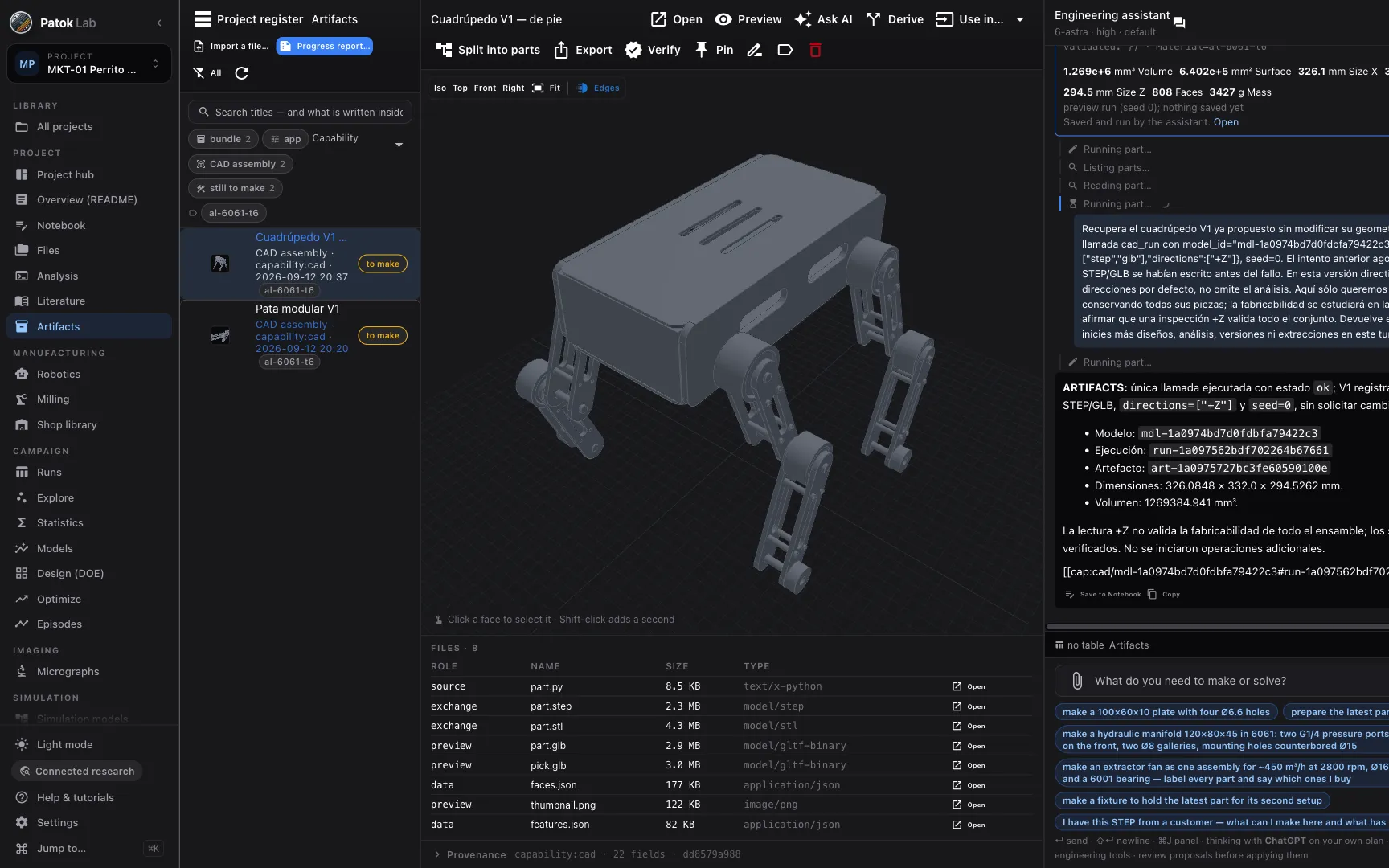
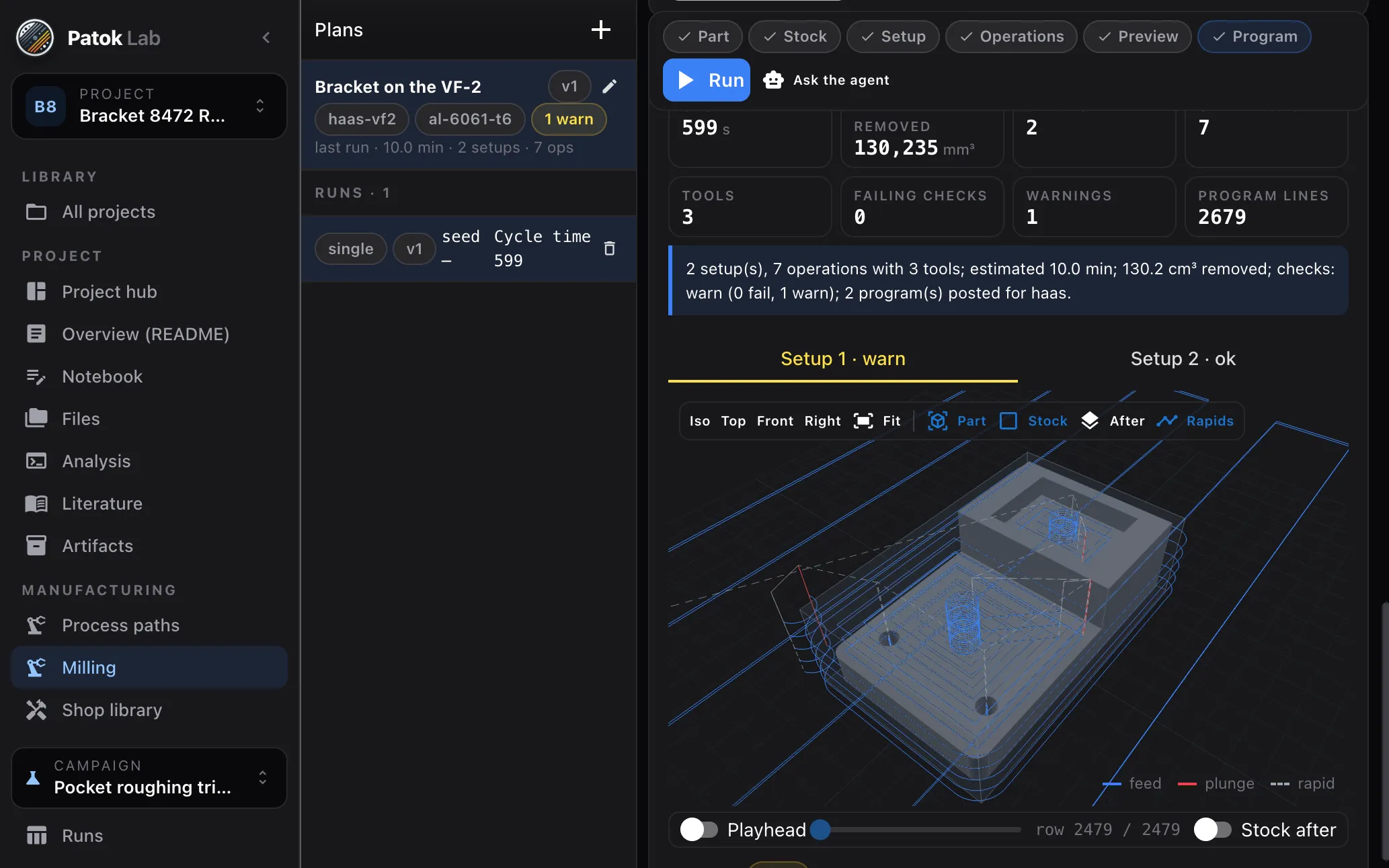
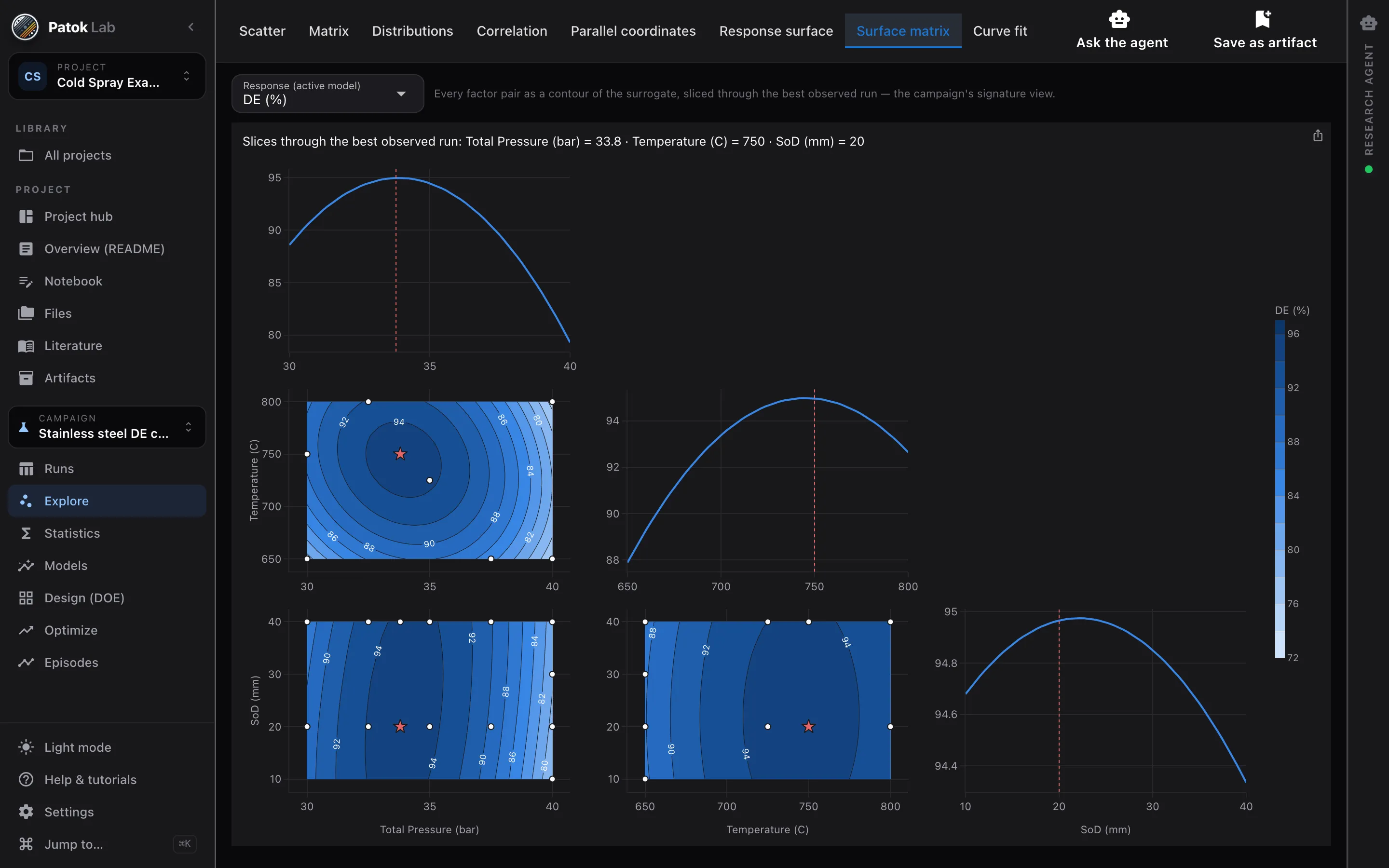
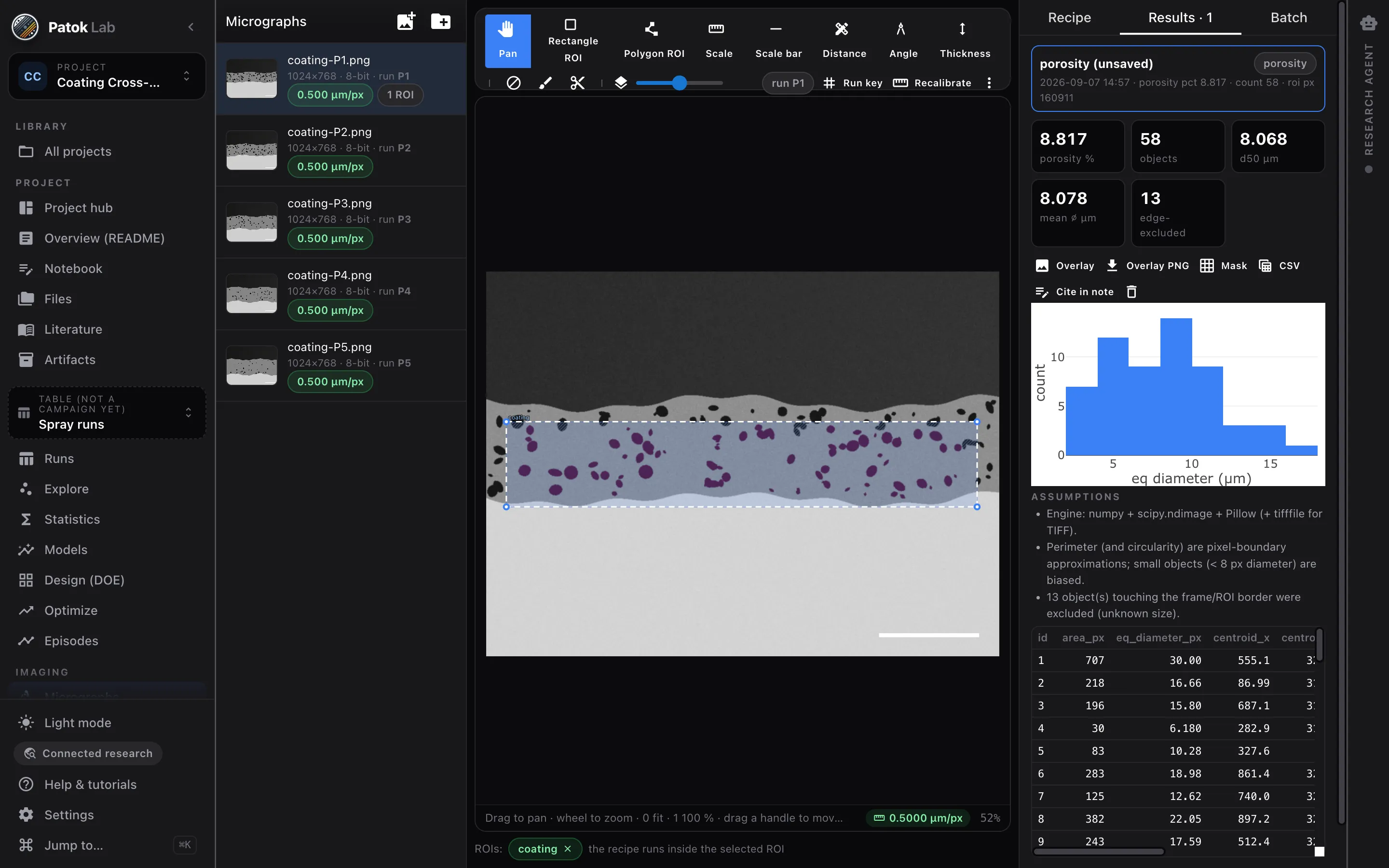
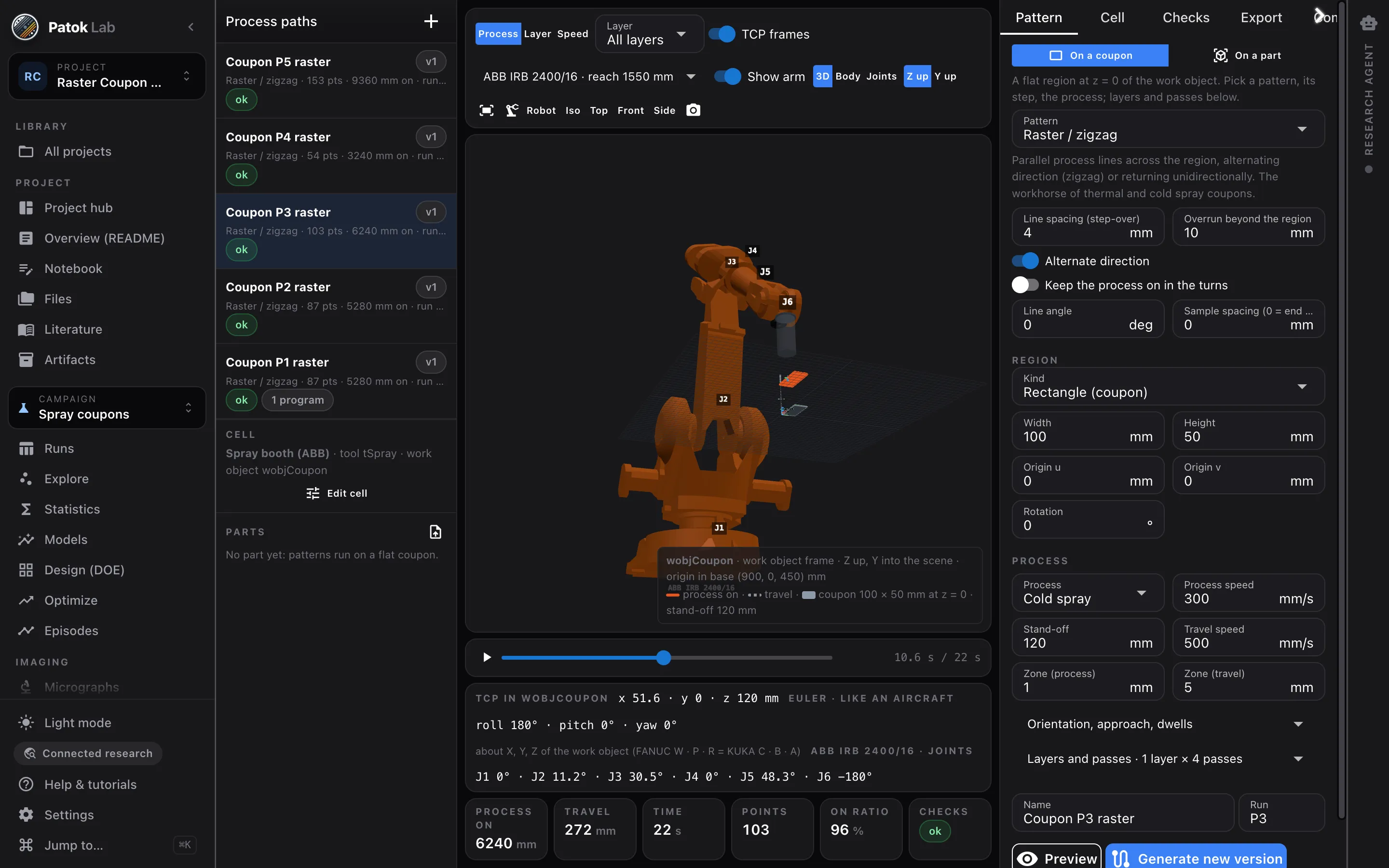
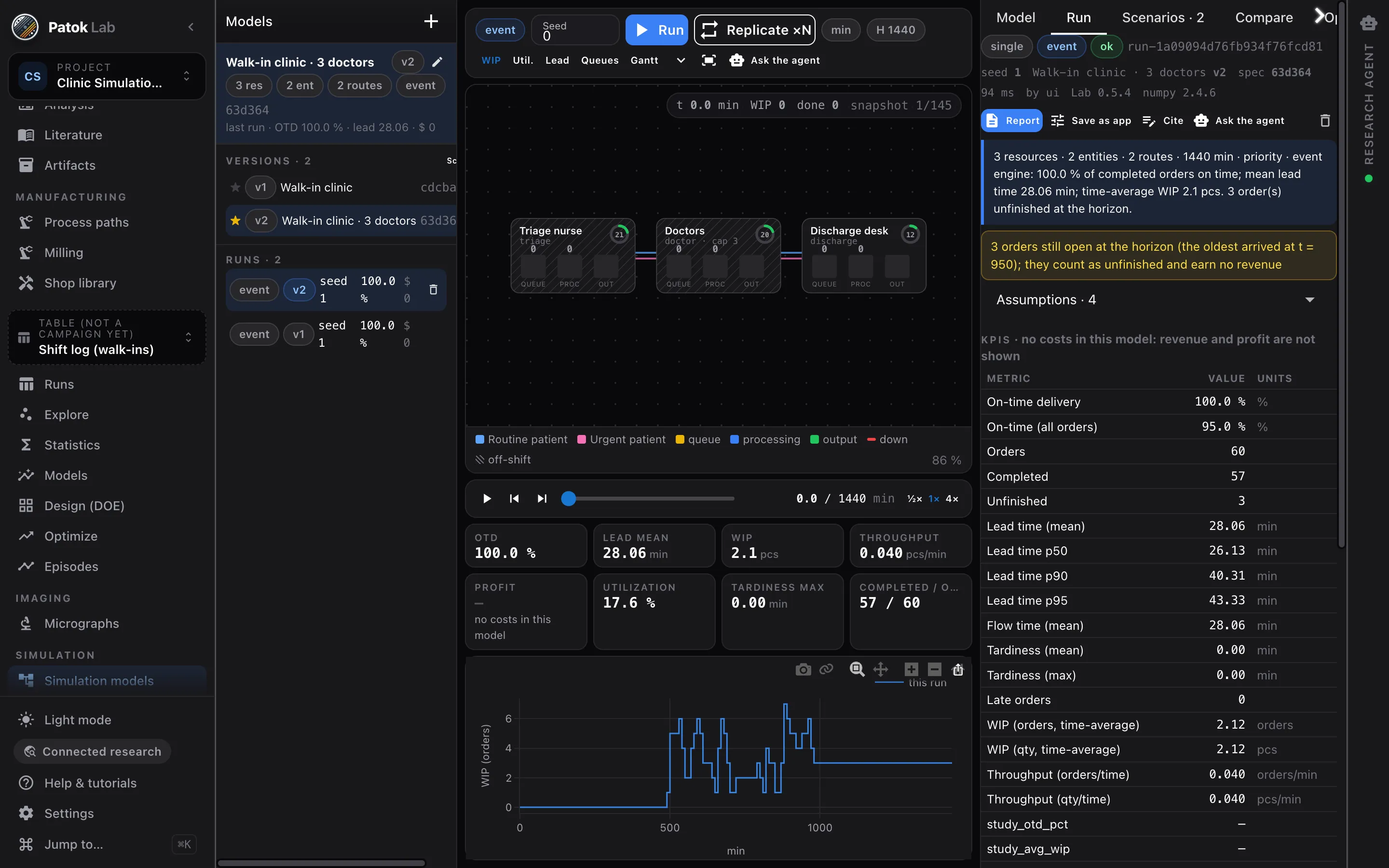
← swipe →
What it costs today
- A program nobody can check
Written offline, trusted on faith, and found out at the spindle — where being wrong is expensive.
- A week re-deriving what you knew
Last year’s runs are in a folder, the model that explained them is gone, and the person who ran them has moved on.
- A number you have to defend
The porosity is in a report, the mask that produced it is on somebody’s laptop, and the review is on Monday.
None of that is a modelling problem. It is what happens when the work and the evidence live in different places.
What does not change
An AI has close to infinite knowledge and no criterion for the situation in front of it. The engineer was always the one who walked out to the bridge and said: it has to be this way, because I am looking at it. That criterion comes from being there, and with it you reach for whatever tools you have.Horacio Canales · founder
In under a minute
So what exactly is Patok Lab?
The question everyone asks first, answered with the real application and nothing staged.
- It runs on your machine. It is not a site you upload your files to.
- Six benches on one project: CAD and machining, molds, experiments, imaging, robots and simulation.
- Everything it makes stays: what made it, which version it came from, and in which files.
Public projects
See what has already come out of it.
Not brochure examples: projects somebody opened in Patok Lab and published with the whole record — the parts, the drawings, the programs and the reports it produced. Open them, read them, or bring one into your own Patok Lab.
Nothing published yet.
The gallery could not be loaded. Try again in a minute.
One workbench, six benches
Ask the AI, work alongside it, or do it yourself.
Six benches, one kind of work each. On every one you can ask the AI to do it, walk through it with you, or press the buttons yourself: it is the same work, kept in the same project. What you do not hand over is deciding whether it is right.
-
CAD & CAM 3-axis milling and turning · aluminium to titanium
drawing → part → program
“Two setups, six operations — and a program I can actually take to the machine.”
You hand it the drawing. You get back a solid the CAD engine built and measured, its engineering drawing, the route read from the part’s own features, the toolpaths simulated and checked, and one program per setup for LinuxCNC, Fanuc, Haas or GRBL. If the part is a body of revolution, the same route comes off bar stock on the lathe.
geometry, milling and turning engines See how it works
-
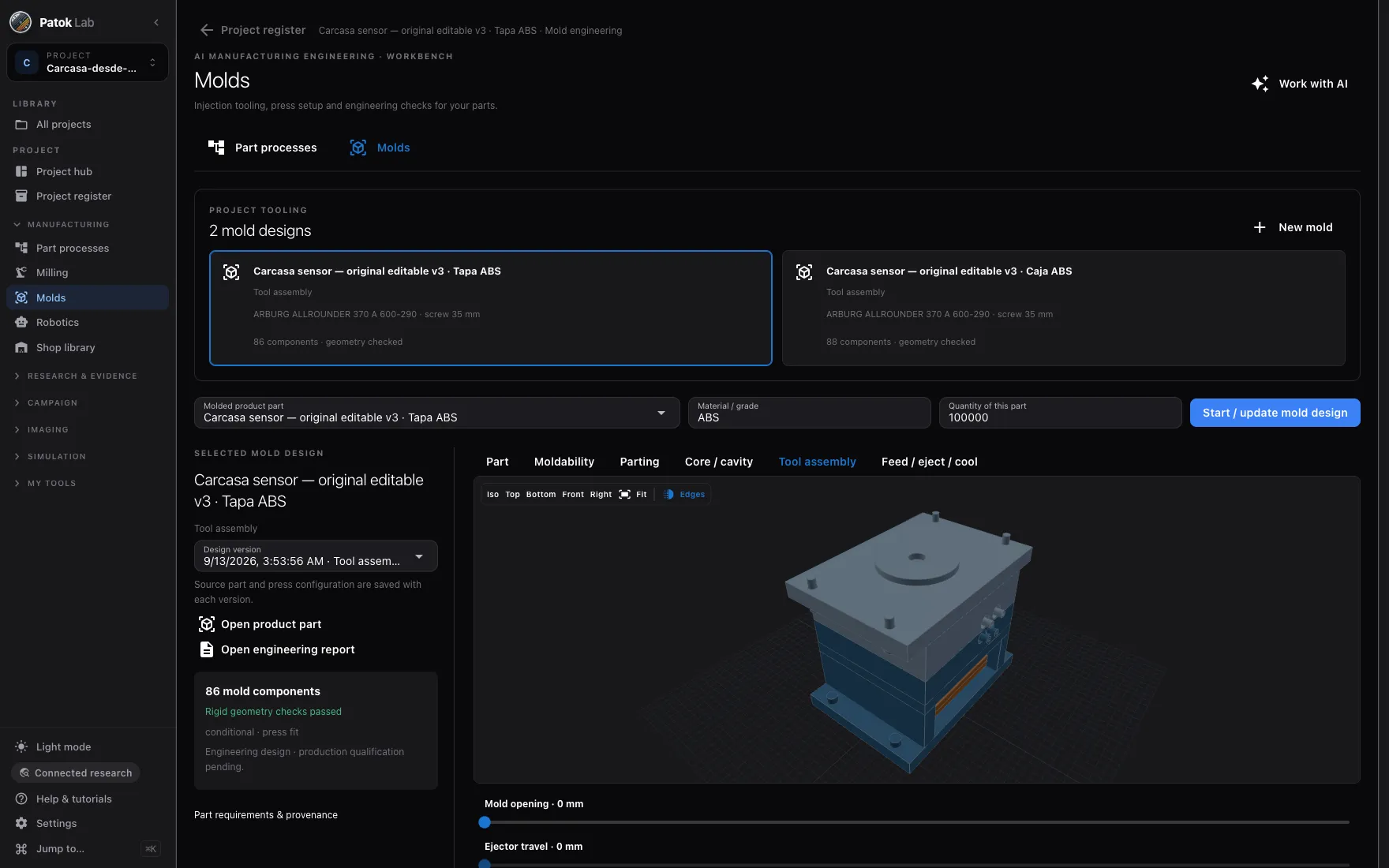
Molds plastic injection · tool and press
part → mold → press
“Can this part be molded, with what tooling, and which press does it land on?”
You bring the part, the material and how many you are making. Out comes the moldability study, where it opens, the core and the cavity, and the tool assembly with its components — with the press saved next to the mold.
mold and press engines See how it works
-
Robotics spray · weld · additive
process intent → trajectory
“A raster on this coupon, a build-up on this part — without teaching forty points on a pendant.”
You describe a pattern on a region and get a trajectory. You watch it in 3D with the arm of your own cell, run the checks, and export the program for ABB, FANUC, KUKA, Yaskawa or UR — offline, kept with the run.
Patok path engine · 63 dialects See how it works
-
Simulation lines · cells · queues
a line → what it would do
“If I add one machine, or change the release rule, what actually happens to the queue?”
You describe the line as it runs: cycle times, setups, failures, shifts, batching, and the rules that release and dispatch work. Then you replicate it with confidence intervals, compare two scenarios, and let the optimizer search the policy.
replications with confidence intervals See how it works
-
Imaging & metrology micrographs · coatings
image → measurement
“What is the porosity of this coating, and can I defend the number?”
You calibrate the scale, draw the region and run a recipe you can read. You get porosity, phase fractions, particle and pore statistics and coating thickness — each with the mask that produced it, and each as a column you can defend.
repeatable · no neural nets See how it works
-
Experiments & DOE any table of runs
many suspects → one cause → the next run
“Which variables actually explain the result — and what should I run next?”
Bring the table you already have. You find out which variable is driving the result, how much of the variation it explains, and the one run that will confirm it — after the measurement has been checked, not before.
validated statistics and models See how it works
Where does my data go?
- Nowhere, unless you send itA project is folders of plain files on your own disk. The app, the engines and a local model all run on your machine.
- One switch, three posturesAir-gapped blocks every connection. Connected research keeps the project and the model local. Only you turn on a remote AI, per project.
- No telemetryPatok Lab sends no usage data. That is a fact of the build, not a setting you have to find.
Projects and artifacts
One project. Everything it makes.
A project is a folder of plain files on your disk: the drawings and papers that came in, the data, the notes — and everything the work produced. Nothing lives in a chat log and nothing is locked in.
Start with one
A part, and everything standing behind it
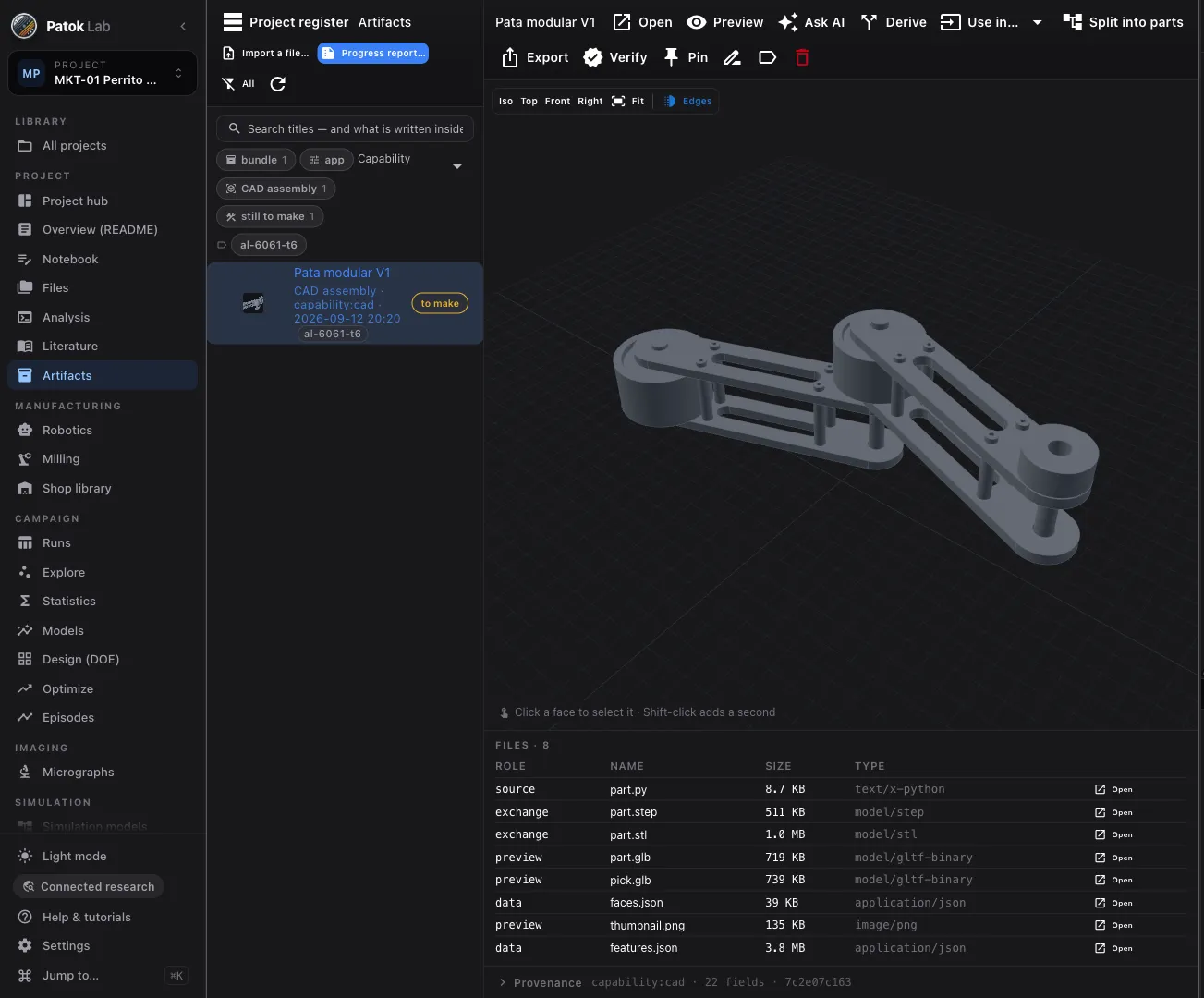
Open any output and it tells you what made it, what it came from, and whether it still verifies. Three rules hold for every one of them: something made it and it says what; it never changes, because a change makes a new version; and it is a folder of files, not one file.
- Verify re-checks every file against its hash
- Derive writes the next version and keeps the old one readable
- Use in… sends a part straight to Milling or Robotics
What the work leaves behind
- Parta solid, and the code that made it, which you can read
- Drawingviews, dimensions, title block
- Manufacturing plansetups, tools, operations
- CNC programone per setup, with its checks
- Robot programoffline, for your controller
- Measurementwith the mask that produced it
- Simulation resultruns, replications, scenarios
- Reportassembled from the records
- Datasetversioned, with roles
- Figurepublication-ready
And it can be read back
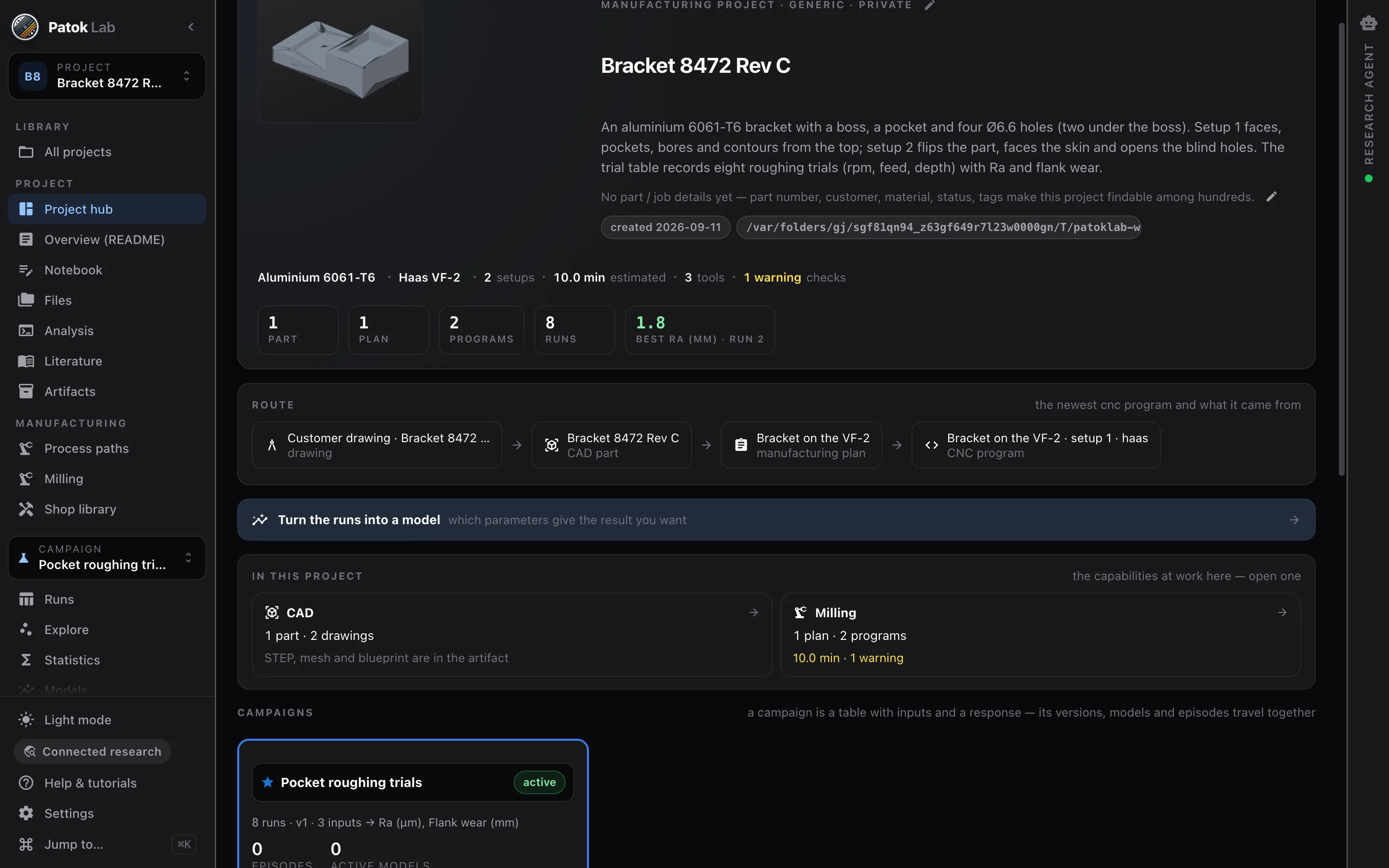
The route is not a folder. It is what the links say.
Every run records what it consumed and what it produced. The hub reads that chain backwards from the newest package to the drawing it started from, with each step’s verdict. Nobody maintains it; it is the links.
The benches
From a customer drawing to the G-code.
A drawing arrives — a PDF, not a model — or a sentence does. The AI — ChatGPT, or a local model on your machine — reads it and writes the geometry as code you can read; the CAD engine builds the solid and measures it rather than asserting it; Patok Lab projects the engineering drawing back out of the part’s own faces, reads the setups from its features, simulates the cut and checks it, and writes one program per setup.
3-axis milling and turning · CAD and CAM
- 01
The part, from one sentence
The model writes the geometry; the CAD engine decides. The result is measured, not claimed: volume, mass, faces, holes, pockets.
- 02
The route, from the features
Which orientations are needed, which features each setup reaches, what the datum and the WCS are. The feeds come from the machine profile — if the recipe asks for more rpm than the spindle turns, it is clamped and the clamp is recorded.
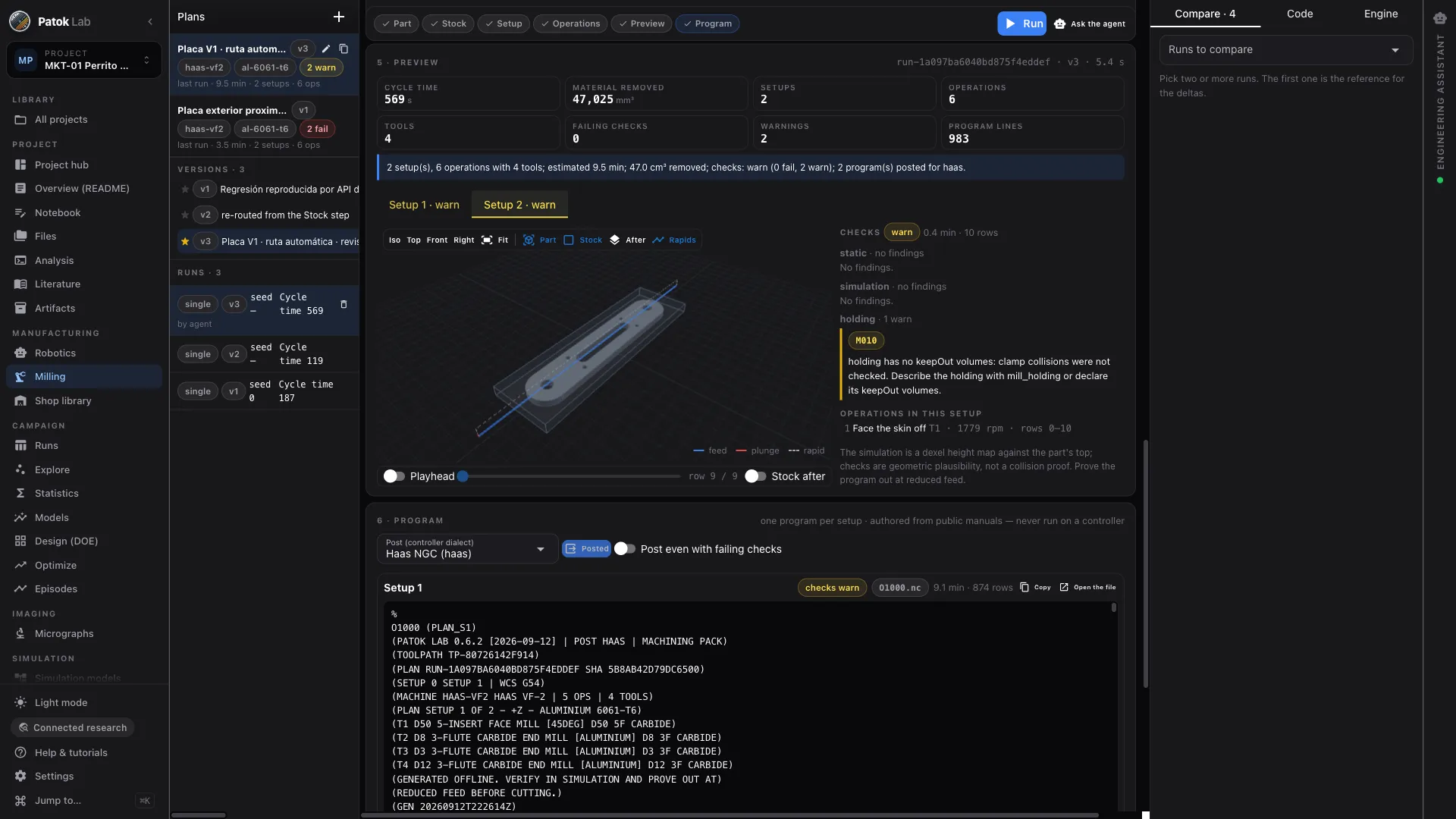
The plate above, as the app measured it
- 2setups
- 6operations
- 4tools
- 9.5 minestimated cycle
- 47.0 cm³material removed
- 0failing checks
Before the spindle turns
- Every program is written offline and carries in its own header the line any shop expects: verify in simulation and prove out at reduced feed before the process is switched on.
- The simulation shows the material the cutter takes off, against the part. It is not a collision study of the whole machine.
Why this and not a chatbot
It computes. It does not guess.
-
The work persists, the chat does not
Data, models, recommendations, micrographs, paths, parts, plans and programs live in one folder of plain files you own, versioned and linked. Close the app and the work is still there, readable without it.
-
AI reasons, engines execute
The model proposes; the statistics, the geometry engine, the imaging recipes and the milling engine do the work. Every number on screen came out of one of them, seeded and reproducible — never out of a sentence.
-
The algorithm is never a black box
Every capability has a Code tab: the exact calculation that ran when you pressed Run. Read it, and for your own capabilities edit it, test it in a separate interpreter and save it as a version. The agent proposes a diff; you accept it.
-
Not a replacement for your CAD/CAM seat
SolidWorks, Mastercam and RoboDK are seats built for a person to draw with. This is a workspace built for the work to be done in, with the artifacts, the provenance and the checks that make any output reviewable. Different job.
Stop being the only one who can do the work.
Choose the brain. The workbench is the same.
A customer’s geometry, a quote you have not sent, eighteen months of process data. Some of it can go out to a big AI and some of it can never leave the building — so you choose, job by job, with one switch. The tools do not change either way.
- Use the AI you already pay for
Sign in the way you sign in anywhere else and it runs on the ChatGPT plan you already pay for. Patok Lab hands it the engines and keeps the approval: you see every step before it runs, and nothing is written without you.
- Or one that runs on this computer
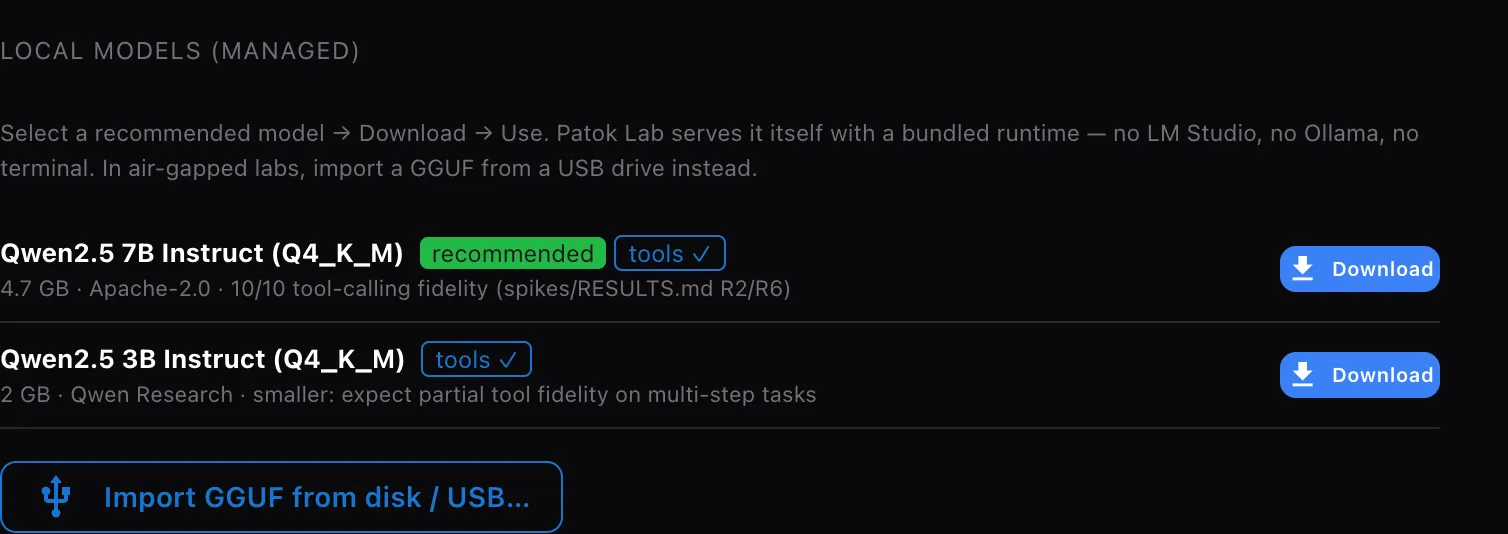
Pick one from the list, Download → Use. No terminal, nothing to install. For machines that never go online, import the file from a USB stick.
- Or the one your company already runs
LM Studio, Ollama or your own, on this machine or on the company network — a server on your own LAN still counts as local.
- One connectivity setting, three postures
Air-gapped blocks every connection. Connected research keeps the project and the model local. Cloud-enhanced lets a remote provider in, on purpose, when you choose it.
- Patok Lab is complete without any model
Every button works with none configured. The engines produce the numbers either way.
- Or an AI that is not sitting in Patok Lab at all
Patok Lab is also an MCP server. The engines — geometry, milling, imaging, robot paths, statistics, simulation — are exposed as tools any MCP client can call, so the assistant you already work in can do the engineering and leave the artifacts here. Patok stays the approval surface either way: nothing is written without you.
- No telemetry
Patok Lab sends no usage data. This is a fact of the build, not a setting.
What we do not claim: OS-level sandboxing. The air-gap guard is policy plus detection, honestly labelled, not kernel-level enforcement. Agent-generated code runs with your user permissions, and capability packages you install are not sandboxed either — they run in the app’s process, with your files.
The research agent
Ask in words. It presses the same buttons you do.
The agent is optional and it needs a model — one you run on your machine, or one you connect on purpose. What it cannot do is reach an answer any other way: every number it hands you came out of the same validated engine that sits behind the button, and everything it produces is an artifact you can open, check and keep.
Three things people actually ask it.
-
Build
“Build this part from the drawing I have open.”
It writes the geometry as code you can read and the CAD engine builds the solid — then reports the volume, mass, faces and holes it measured, not the ones it claimed.
-
Decide
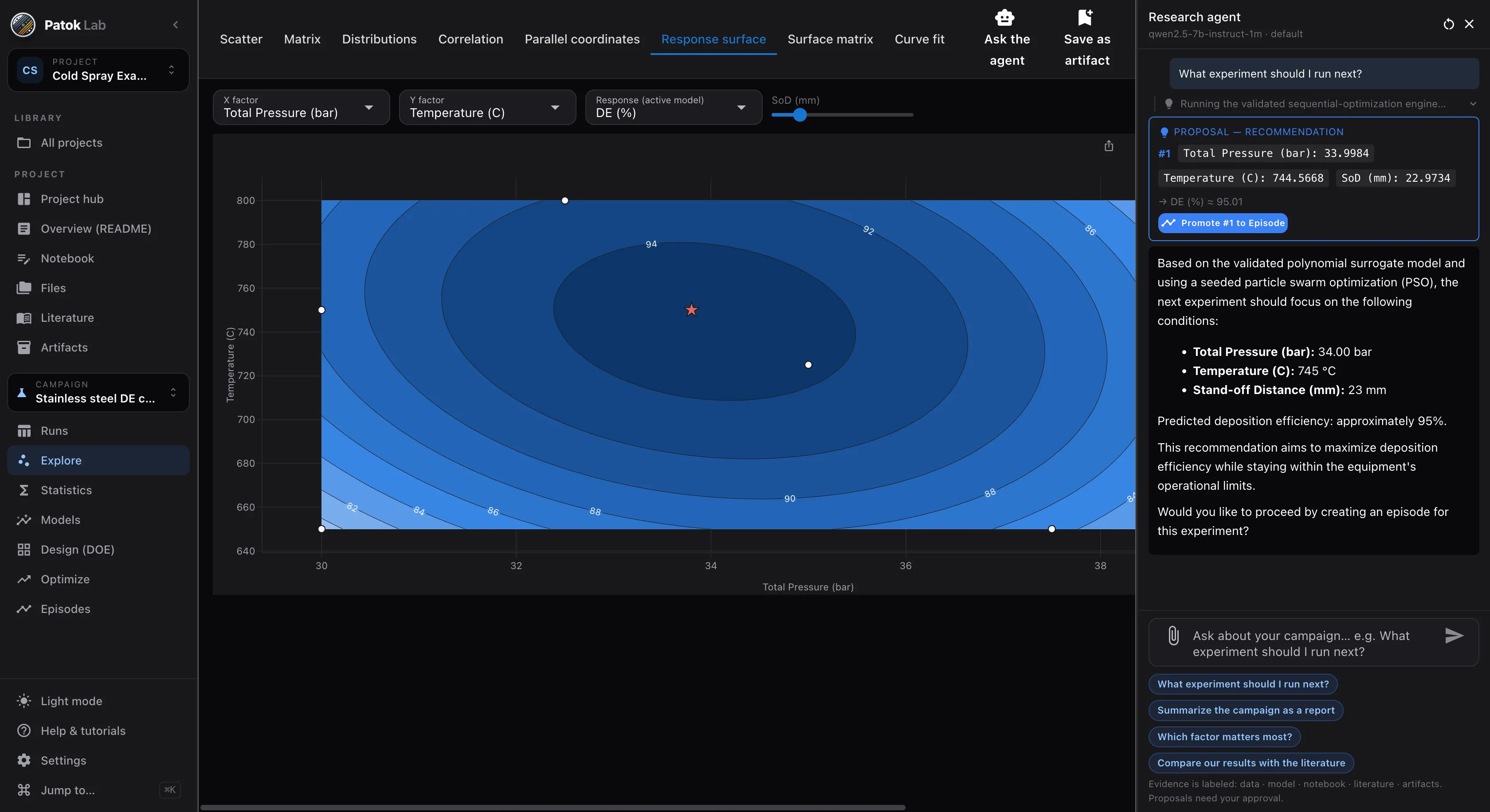
“What experiment should I run next?”
It calls the validated sequential engine and returns a proposal card: 34.0 bar, 745 °C, 23 mm, predicted 95 %. The same numbers the Optimize button gives, seeded and reproducible.
-
Program
“Two layers, the second rotated ninety degrees, two seconds of cooling between them.”
It does not draw motion. It calls the same path engine with that change, and version three is written like every other version — with its checks and its export.
What it is not
- Read the tool output, not the paragraph. A small local model can write a confident sentence its own tool result contradicts; the evidence sits beside the prose precisely so you can catch it.
- It asks before it runs a calculation on your data, and a proposal is saved only when you approve it.
- It cannot invent a citation: a reference has to resolve to a page you actually hold.
- Patok Lab is complete without it. Every button works with no model configured at all.
Who it is for
Built for the lab, the engineering office and the shop.
One workbench, three places where engineering gets decided. Nothing has to leave the building.
In the research lab
Materials scientists · experimental researchers · PhD students and postdocs · principal investigators · lab directors
- Sixteen runs and a hypothesis: which factor matters, and what is the next experiment worth its cost?
- A folder of cross-sections and a porosity spec: measure all of them the same way, with evidence.
- A campaign spread over Excel, scripts and papers, six months later.
In the plant’s engineering office
R&D · process · manufacturing · quality · materials · welding · additive · robotics engineers
- Eighteen months of welding parameters and quality results: which variables actually explain defects?
- A coating line’s porosity against its recipe; a capability study from the production log.
- A spray or deposition path for a new part, written offline before the cell is booked.
In the shop and the methods office
CNC programmers · methods and manufacturing engineers · tooling designers · job shops and contract manufacturers
- A customer drawing as a PDF and an answer needed today: what the part is, how many setups, how long it runs.
- Feeds and speeds that live in one person’s head, and a program nobody can reproduce next month.
- A program that has to be checked before the spindle turns, not after.
Orders, WIP, delivery dates and floor execution are a different product: Patok Enterprise, on patok.in.
Applications
Where the whole loop already runs.
-
Machining & CNC
A customer drawing becomes a solid, a blueprint, a multi-setup route and one program per setup — and the roughing trials become a campaign with a model.
- full loop
Thermal spray & coatings
Parameters → experiment → coating → micrograph → porosity and thickness → model → next recipe → spray path. The flagship application, end to end.
- experiments · paths
Welding
Pass/fail and porosity against current, speed and gas flow; classifiers and regression on the same table. Path generation with a torch preset.
- robotics
Additive deposition
Build-ups with strategies per layer, slicing of imported parts, cooling pauses for wire arc, Metal Knitting walls.
- experiments
Process development
Any table of controllable inputs and measured responses: sintering, kinetics, formulations, machine settings.
Early access
Early access for people who run real processes — labs, engineering teams and shops.
Bring a customer drawing, a table of runs, a folder of micrographs or a part you spray, weld or mill. We want Patok Lab used on live work and told what breaks. The Community edition is free, with no time limit; macOS, Windows and Linux.
- macOS, Windows and Linux — tell us which one you need first
- Direct line to the founder during early access
- Optional workshop for your group or team: bring a job, leave with an artifact
- 01Tell us what you would bringA drawing, a table of runs, a folder of micrographs, a part, a line.
- 02The build arrives by e-mailInstaller, a licence you paste once, and a short guide for the bench you came for.
- 03Reply with your fileWe look at it before we send it, and a person answers — not a form.
Get access Bring a drawing, some photos, a table or a part. Or just tell it.
Bringing it to a team, a shop or a university group? Ask for your team →
Where Patok Lab sits
One track, from engineering to the plant floor.
Everything that happens in Patok Lab is engineering work: understand the problem, design the experiment, measure what came out, make the part and write the program. From there it reaches the floor. The method is taught at Patok Academy; the workbench is here.
- 01
Understand the system
Flow, WIP, throughput, lead time, variability. Flow Fundamentals, free, with a certificate.
Academy · free - 02
See the data
What is observable in the plant and how invisible behaviour becomes data.
Academy - 03
Optimize
From plant-level tradeoffs to process parameters: macro to micro.
the bridge - 04
Learn from the experiment
Designed experiments, validated models, the next run — and the robot path that runs it.
Patok Lab · you are here - 05
Measure what it produced
Scientific imaging and metrology: micrograph → measurement → statistics.
Patok Lab - 06
Make the part
From the drawing to the solid, to the setup plan and the CNC program, checked before the spindle turns.
Patok Lab - 07
Execute
Production visibility and execution on the floor: Gemba, Office, assistants.
Patok enterprise
Scientific AI for Manufacturing — the guided course with certification and a 30-day Patok Lab pass — opens in November 2026. Early access is open now.
Who is behind it
Built by someone who has stood at every one of those benches.
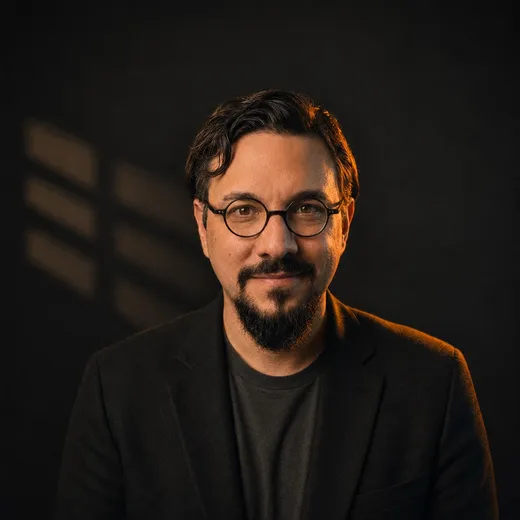
Horacio Canales, PhD · Founder, Patok Research
His first job was in front of a CNC machine. Years programming in Mastercam, making motorcycle parts; then mechanical design for automation cells; then experimentation, which is where he stayed: a doctorate in engineering sciences in Ukraine, then a researcher at the Universitat de Barcelona on surrogate models and sequential experimentation for thermal-spray coatings — before industrial AI was a category.
The feed this machine takes, the setups this part needs, the recipe that measures this coating — that much can be written down, and the workbench runs it. What can’t be written down is the judgment they hired you for, and it is worth more when it stops being buried under the rest.
Patok Lab is an attempt to put the tools within reach of that criterion — and to let the criterion an engineer or a scientist establishes stay written down, with its evidence, instead of leaving with the person who had it.
Trained at, worked with and recognized by









FAQ
Questions engineers and researchers ask first.
Does Patok Lab require cloud access?
No. Patok Lab runs on your machine, with its calculation engine bundled and a local model server built in. In the default “connected research” posture the only things that go out are a model download you start and, if you use Find state of the art, the text of your literature query to open scholarly indexes. Air-gapped mode blocks everything and you import model files from disk or USB. A remote AI provider is only used if you switch to cloud-enhanced.
Can I use my existing Excel/CSV experiments?
Yes. Import XLSX or CSV, choose the sheet and header row, and classify columns as inputs, responses, categorical factors and metadata with units and physical bounds. The source file is copied read-only; every save is a new version. You can append new runs later from an updated file, paste from Excel, and export the current version back to CSV or XLSX.
Do I need to install anything else?
No. Everything ships inside the application. No admin rights are needed, and you never install or manage anything else. You can read the calculation behind any analysis it produces.
Can I use a local AI model?
Yes. Settings → Local models lists curated models (Qwen2.5-7B-Instruct is the recommended one) with Download → Use, served by the bundled runtime. You can also import a GGUF file, or point Patok Lab at any OpenAI-compatible endpoint such as LM Studio, Ollama, vLLM or a hosted API. The agent needs a model with reliable tool calling; very small models work only partially, and Patok Lab tests this for you when you connect one.
What kind of experiments is Patok Lab for?
Any campaign that can be written as a table of controllable inputs and measured responses: process parameters versus a property, formulations versus a performance, machine settings versus a quality. The six built-in examples span a coating campaign, powder adhesion (ANOVA), a sintering screening design, Arrhenius kinetics, weld pass/fail and a production log. Continuous and categorical factors, one or several responses.
Who is early access for?
Experimental researchers and labs with a real dataset — materials science, additive manufacturing, coatings and thermal spray, manufacturing and process development. Students, PhD students, postdocs, PIs, R&D engineers and lab directors. We are looking for people who will use it on a live campaign and tell us what is missing.
Can you run a workshop for our research group?
Yes. A half-day or full-day session where your group brings its own campaign data, builds the project, fits and verifies models and leaves with a recommended next experiment. Tick “interested in a workshop” in the form and we will get in touch.
Is Patok Lab only for research?
No. It is a technical workbench: a manufacturing, process or quality engineer with eighteen months of parameters and results uses it the same way a lab does — table in, model, optimization, next trial — and the data stays on the company machine. What it is not is an operations system: orders, WIP and delivery dates belong to Patok Enterprise on patok.in.
Can it measure micrographs?
Yes — Scientific Imaging & Metrology has shipped. Calibrate the scale, draw a region, build a repeatable recipe (median, Otsu, size filters, edge exclusion, manual corrections recorded as steps) and get porosity, phase fractions, particle and pore statistics, coating thickness normal to the interface, and crack heuristics — each with its mask and per-object table, and each result can become a column in the runs table. No neural networks, no cameras; classical measurement, with the evidence in view.
Does it program robots?
It writes offline programs. Describe a pattern on a region (raster, serpentine, contour, spiral, Metal Knitting, layers, slicing) on a coupon or an imported STL/PLY/OBJ/3MF part, see the trajectory in 3D with the arm of your cell, run the checks, and export the program for ABB, FANUC, KUKA, Yaskawa, Universal Robots and others (eight post-processors validated against reference files; the rest say so). Patok Lab never talks to a controller and its collision envelope is not a proof: simulation and a dry run stay in the loop.
What platforms does Patok Lab support?
Patok Lab is a desktop application for macOS, Windows and Linux. Early-access builds are delivered as direct downloads (no app store, no auto-updates), and we ship platforms in the order early-access members ask for them — choose yours in the form.
Is there a trial, and how will licensing work?
Every install is the Community edition, free with no time limit: the workbench, the assistant with any brain, CAD, assemblies, drawings, Python, literature, data and statistics. A license adds Patok's engines — milling, turning, industrial controller posts, molds, DOE and optimization, imaging metrology, robotic process paths, simulation, release packages — plus private and offline projects and commercial use. Licenses activate offline — a short signed key or a file, nothing is sent anywhere — and the direction is perpetual licenses per version for researchers and labs, with optional updates, plus workshops and scientific consulting. When a license or trial ends the app never locks your data: reading, export and backups keep working.
Does this replace SolidWorks, Mastercam or RoboDK?
No, and it is not trying to. Those are seats built for a person to draw and program with, and they are very good at it. Patok Lab is a workspace where the work gets done and kept: the part, the drawing, the plan, the programs and the data all live in one project with their provenance, so anything an AI or a person produces can be reviewed. Many users will have both, and Patok Lab reads and writes STEP, IGES, BREP, STL, OBJ, 3MF and DXF so the part can move between them.
Can I use ChatGPT with confidential geometry?
That is your call, per project, and the app makes it explicit. In the default “connected research” posture a remote AI is refused outright — only a literature query can leave. To use ChatGPT you switch connectivity to cloud-enhanced on purpose, and you see each tool call before it runs. If the geometry cannot leave the building, run a local model instead: everything except the agent works with no model at all, and the engines produce the same numbers either way.
Is the G-code safe to run?
Treat it the way you would treat any program written offline. The post-processors are authored from public manuals and have never been run on a controller — every program says so in its own header, and asks for a simulation and a dry run at reduced feed before the process is switched on. What is verified is the simulation, the nine machining checks and the G-code lint; a failing check blocks the post unless you force it. It is not a collision proof, and the cycle time has no acceleration model.